# Security & Trust
> How mytesla.io authorizes access, keeps Tesla tokens server-side and encrypted, limits the AI to 40 fixed tools with no driving, and lets you revoke access anytime.
mytesla.io gives an AI assistant the ability to run real commands on your Tesla,
so how access is authorized and how your data is handled matters. This page is a
plain summary of exactly what the connector can do, what it can't, and what we
do and don't keep. A machine-auditable version — including the full tool
manifest and architecture — lives in our public connector repository.
## The short version
- Your **AI client never receives your Tesla tokens.** They're held server-side,
encrypted, and never travel over the connector.
- Access is via **Tesla's official OAuth** — we never see your Tesla password.
- The **scope you approve on Tesla's screen is the hard ceiling.**
- **40 fixed tools, no "drive" tool.** Nothing that moves the car.
- **Revocable instantly** from your Tesla account.
- We **don't store** your location, drive, or charge history; we **don't sell**
data; we **don't train** models on it.
## How authorization works
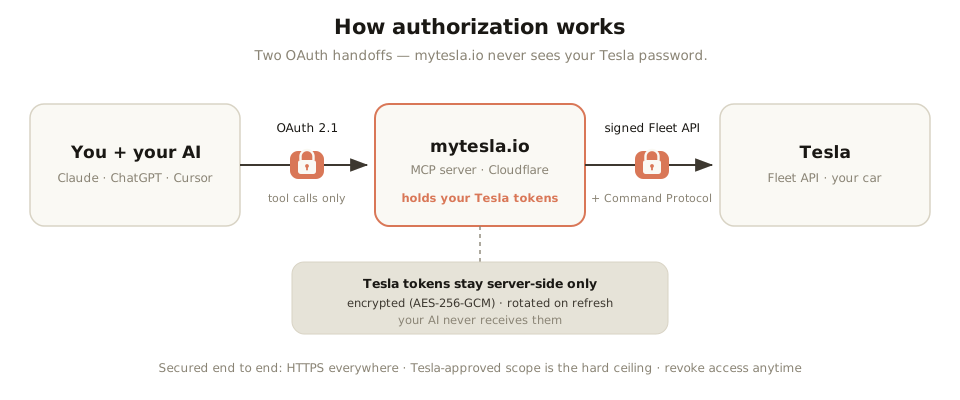
Two OAuth handoffs — your Tesla tokens stay server-side and your password is never shared.
There are two separate OAuth relationships, and neither exposes your Tesla
credentials to the AI:
1. **Your AI client → mytesla.io.** Claude, ChatGPT, Cursor, or any MCP client
connects to `https://mcp.mytesla.io/mcp` over **OAuth 2.1**. Every request is
authenticated as you — there's no anonymous access.
2. **mytesla.io → Tesla.** You authorize on **Tesla's own consent screen**,
where we appear as "Embay, LLC," and approve a specific scope. A one-time
virtual key on the car lets it trust commands we sign through Tesla's Vehicle
Command Protocol. **We never receive your Tesla password.**
## Your tokens stay server-side
This is the part people most often get wrong about AI + car control:
- **Your AI client never sees Tesla OAuth tokens.** Over the connector, the
client sends and receives **tool calls** (like `set_charge_limit(80)`) — never
credentials or tokens.
- Tesla tokens are stored **only** on our server, **encrypted at rest**
(AES-256-GCM), and **rotated** on every refresh.
- Your **prompts are processed by your own AI assistant**, not by us — we
receive the resulting tool call, not your raw conversation.
## What the AI can and can't do
- **Can:** read status and run climate, charging, access, alerts, navigation
sharing, and a few security toggles — **40 fixed tools**, listed in full in our
connector repo.
- **Can't:** drive the car. There is no steering, acceleration, or
Autopilot/FSD tool. It also can't exceed the Tesla scope you approved, and it
can't bypass PIN-protected functions (Valet Mode, speed limit) — those need
the PIN you set.
## You can revoke access anytime
Independent of any AI, you can cut access instantly:
1. **At Tesla:** your Tesla account → third-party apps → remove "Embay, LLC."
2. **In your AI client:** remove the connector.
Either one immediately stops any further access, no matter what a prompt asks.
## Auditability
Because the production server is closed-source, we publish a **public
specification and security repository** so the connector can be reviewed:
the full tool manifest (with read-only vs. state-changing annotations), the
authorization and token-handling model, and an architecture diagram of exactly
where your prompts go and where tokens live. See the links below.
## Reporting a vulnerability
Email **security@mytesla.io** with details and reproduction steps. Please don't
file public issues for security matters — we'll acknowledge and coordinate a fix.
## More
- [Privacy policy](/privacy) — the full data policy.
- [What is a Tesla MCP server?](/tesla-mcp-server) — how the protocol works.
- [Is it safe to connect AI to your Tesla?](/is-it-safe-to-connect-ai-to-your-tesla)
- Public connector spec & security repo:
— full tool manifest, security
model, and architecture.
- Not affiliated with Tesla, Inc. mytesla.io is a service of Embay, LLC.